


GOMO’s UNLI Data plan provides unlimited internet access for mobile users, ensuring they stay connected at all times.
This blog post offers a concise step-by-step guide on how to register for GOMO UNLI Data, allowing you to enjoy seamless and unlimited browsing on your mobile device.
Features:
- Unlimited data usage up to 5Mbps
- No lock-in period
- Can be used as a Wi-Fi hotspot
- Can be used for streaming, gaming, and browsing
Pricing:
- PHP 599 for 30 days

GOMO Unli Data Promo Offers are exclusively available during flash deals, ensuring you get the best value for your money.
To stay updated on the latest deals, make sure to regularly check the GOMO App, GOMO Facebook Page and Gcash App. These platforms provide you with the most up-to-date promotions, allowing you to take advantage of new and exciting offers as they become available. Stay connected with GOMO and never miss out on the opportunity to enjoy unlimited data at fantastic prices.
Here’s a step by step guide on how to Register to Gomo Unli Data
Check Device Compatibility
Ensure your mobile device supports GOMO’s 4G LTE network to avoid compatibility issues.Download and Install the GOMO App
Find and download the official GOMO app from your device’s app store.Create a GOMO Account
Register using your mobile number, email address, and password.Verify Your GOMO Account
Enter the verification code sent to your mobile number.Log in to Your GOMO Account
Use your registered mobile number and password to log in.Click on “SHOP”
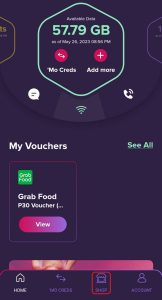
7. Navigate to the GOMO UNLI DATA Flash Deal
Find the UNLI Data option in the app’s interface.

8. Select GOMO UNLI Data Plan
Select Gomo Unli Data Plan for Php599.
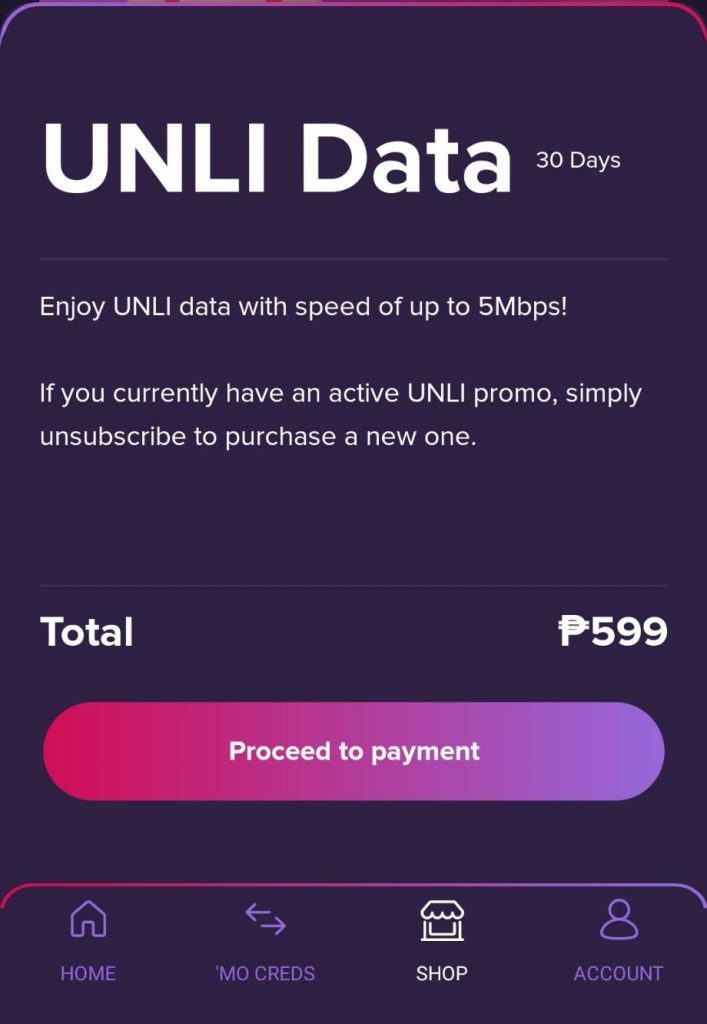
9. Complete the Registration Process
Confirm your selection and provide any additional information required.
10. Enjoy GOMO UNLI Data
Start enjoying unlimited internet access on your mobile device.
Don’t miss out on the incredible Gomo Unli Data Flash Deals, which last only for a day! Stay updated by checking their Gomo Facebook Page, Gcash App, and Gomo App.
You can purchase GOMO Sim with 30GB No Expiry at Shopee.
To register you Gomo Sim, check it here.
You can also check out our comparison on GOMO Unli Data VS Smart Unli Data.
