Close Menu
    Facebook X (Twitter) Instagram
    Latest Tech News in The Philippines
    Facebook YouTube TikTok X (Twitter) Instagram
    BALASTECHBALASTECH
    • Tech News
    • Reviews
    • Gaming
    • Tech Tips
    BALASTECHBALASTECH
    Home»Apps»NVIDIA Broadcast now uses deepfake to keep you looking at your camera!
    Apps

    NVIDIA Broadcast now uses deepfake to keep you looking at your camera!

    Dante BisaisBy Dante BisaisJanuary 14, 20232 Mins Read
    Facebook Twitter LinkedIn Email
    NVIDIA Broadcast now uses deepfake to keep you looking at your camera!
    Share
    Facebook Twitter LinkedIn Pinterest Email

    NVIDIA Broadcast streaming software now allows you to look like you make eye contact with the camera even if you’re looking elsewhere in real life. 

    NVIDIA Broadcast

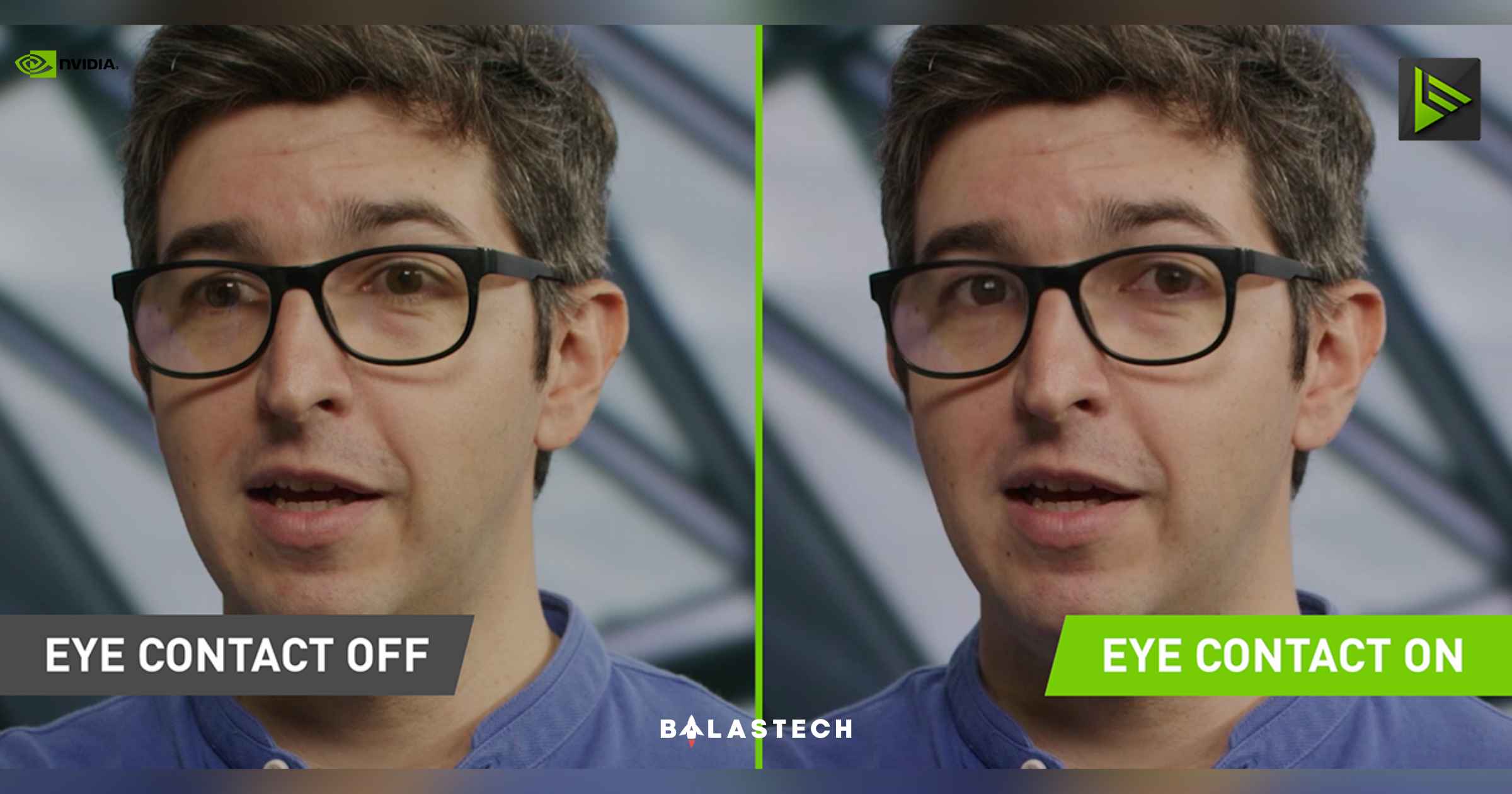
    NVIDIA Broadcast adds an Eye Contact feature

    In the latest update of the NVIDIA Broadcast, it adds the new Eye Contact feature that moves the speaker’s eyes to imitate eye contact with the camera which achieves by estimating and aligning gaze. 

    To transition between simulated and real eyes smoothly, the eyes maintain their original color and blink patterns. There is also a disconnect option in case you stare too far away. 

    For content creators who don’t want to have to look directly at the camera or who want to capture themselves reading notes or a script, Eye Contact is the answer.  

    Presenters in video conferences will gaze into their audience members’ eyes to increase audience engagement. Besides, there’s numerous eye color and illumination combinations exist. 

    Eye Contact is currently in beta so expect some bugs. NVIDIA wants to collaborate with the community to make it better. You may send them a quick video when you test it and find any issues, or you just want to help them improve this AI effect more. 

    Here’s an NVIDIA Broadcast Eye Contact demo of Mitchell Clark of The Verge: 

    Clark said, “I’m not a huge fan of Eye Contact — I think it makes things just look a little off. Part of that is the animated eye movement. While it’s very cool that it’s even possible, it sometimes ends up making it look like my eyes are darting around at superhuman speeds.” 

    Since many of us continue to work from home and wish to cover up the mess that is lying behind us at our desks, NVIDIA has also made some adjustments to its virtual backgrounds. A new Vignette effect has been added, and the Blur, Replacement, and Removal effects have been improved for stability. This feature is like those apps like Instagram. 

    Broadcast has also included two of the most often requested community features: the ability to mirror your camera and snap a screenshot of your webcam! 

    All NVIDIA and GeForce RTX GPU owners may get started and download NVIDIA Broadcast for free now. 

    Via: NVIDIA, The Verge

    Eye Contact NVIDIA Virtual Background
    Share. Facebook Twitter Pinterest LinkedIn Email
    Dante Bisais
    • Website
    • Facebook
    • X (Twitter)
    • Pinterest
    • Instagram
    • LinkedIn

    Dante is an Information Technology graduate who is fascinated by technology especially computers. His passion for computers started when he was 11 years old, that inspired him to explore further. Besides writing, he also share his reviews on his YouTube channel.

    Related Posts

    Apple MacBook Neo is now official for only PHP 39,990

    March 5, 2026

    Apple Unveils MacBook Pro 14- and 16-inch with M5 Pro and M5 Max Chips

    March 5, 2026

    Apple Launches New MacBook Air with M5 Chip

    March 5, 2026

    Invest Smartly and Securely with Metrobank Online UITFs

    March 5, 2026
    Leave A Reply Cancel Reply

    • Facebook 16K
    • Instagram
    • YouTube 38.3K
    • TikTok
    • Twitter
    • LinkedIn
    Latest

    Samsung Galaxy S26 Ultra First Impressions: I Love the Slimmer Design

    March 5, 2026

    Apple MacBook Neo is now official for only PHP 39,990

    March 5, 2026

    Apple Unveils MacBook Pro 14- and 16-inch with M5 Pro and M5 Max Chips

    March 5, 2026
    BALASTECH
    Facebook YouTube TikTok X (Twitter) Instagram
    • Home
    • About Us
    • Contact Us
    • Privacy Policy
    • Terms and Conditions
    Copyright © 2026. BALASTECH

    Type above and press Enter to search. Press Esc to cancel.