
Close Menu
    Facebook X (Twitter) Instagram
    Latest Tech News in The Philippines
    Facebook YouTube TikTok X (Twitter) Instagram
    BALASTECHBALASTECH
    • Tech News
    • Reviews
    • Gaming
    • Tech Tips
    BALASTECHBALASTECH
    Home»Tech News»Globe Prepaid eSIM is now available! How to buy/install?
    Tech News

    Globe Prepaid eSIM is now available! How to buy/install?

    Dante BisaisBy Dante BisaisMarch 22, 2024Updated:March 22, 20243 Mins Read
    Facebook Twitter LinkedIn Email
    Globe Prepaid eSIM is now available! How to buy install
    Share
    Facebook Twitter LinkedIn Pinterest Email

    After waiting many months, Globe finally released its Globe Prepaid eSIM!

    To recall, Globe Telecom announced last August 2023 that they would have a Prepaid eSIM by the end of September but it was released only now. Although they also released a Prepaid Traveler eSIM last October 2023.

    For those unaware, an eSIM, or embedded SIM, is the digital equivalent of a physical SIM card that enables network connectivity and electronically identifies your device. Modern smartphones come preinstalled, meaning you won’t need to acquire a new SIM card if you switch phones or cellular providers because it can be remotely changed via software. 

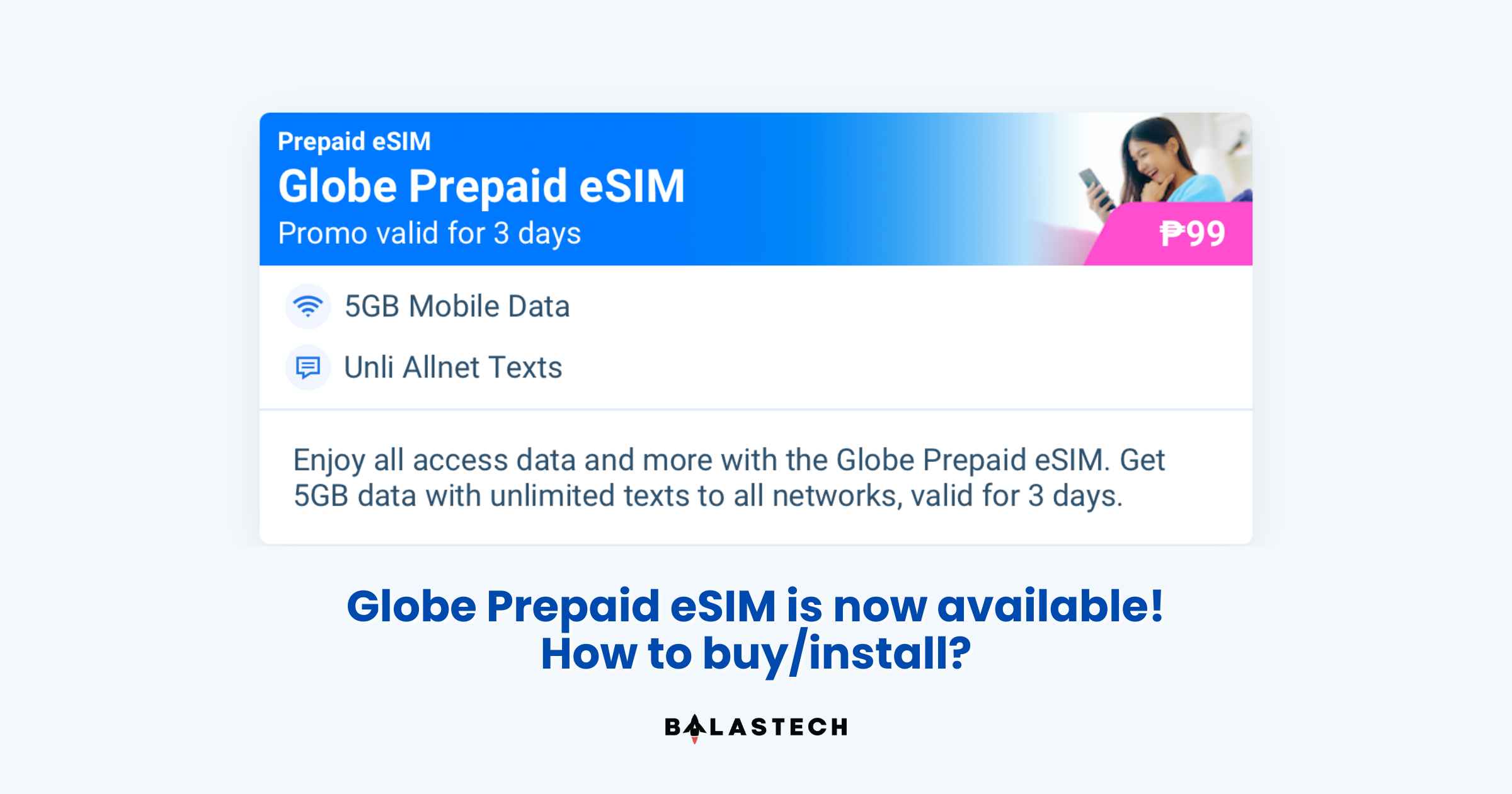
    The Globe Prepaid eSIM is now available on the GlobeOne App for only PHP 99. It comes with 5GB mobile data and unlimited text to all networks valid for 3 days upon activation. For a step-by-step guide on how to buy and activate the Globe Prepaid eSIM, just follow these tutorials:

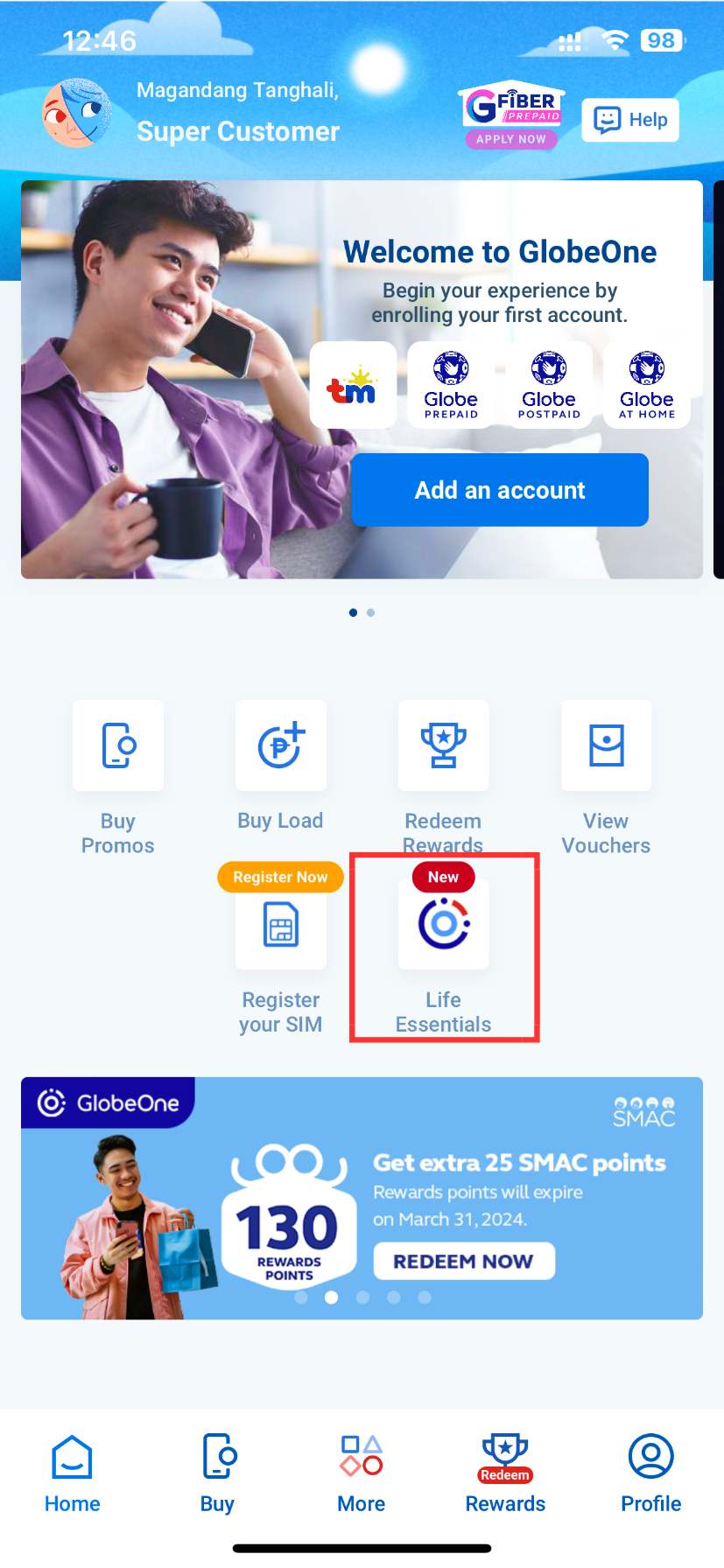
    Choose the Life Essentials icon
    Choose the Life Essentials icon
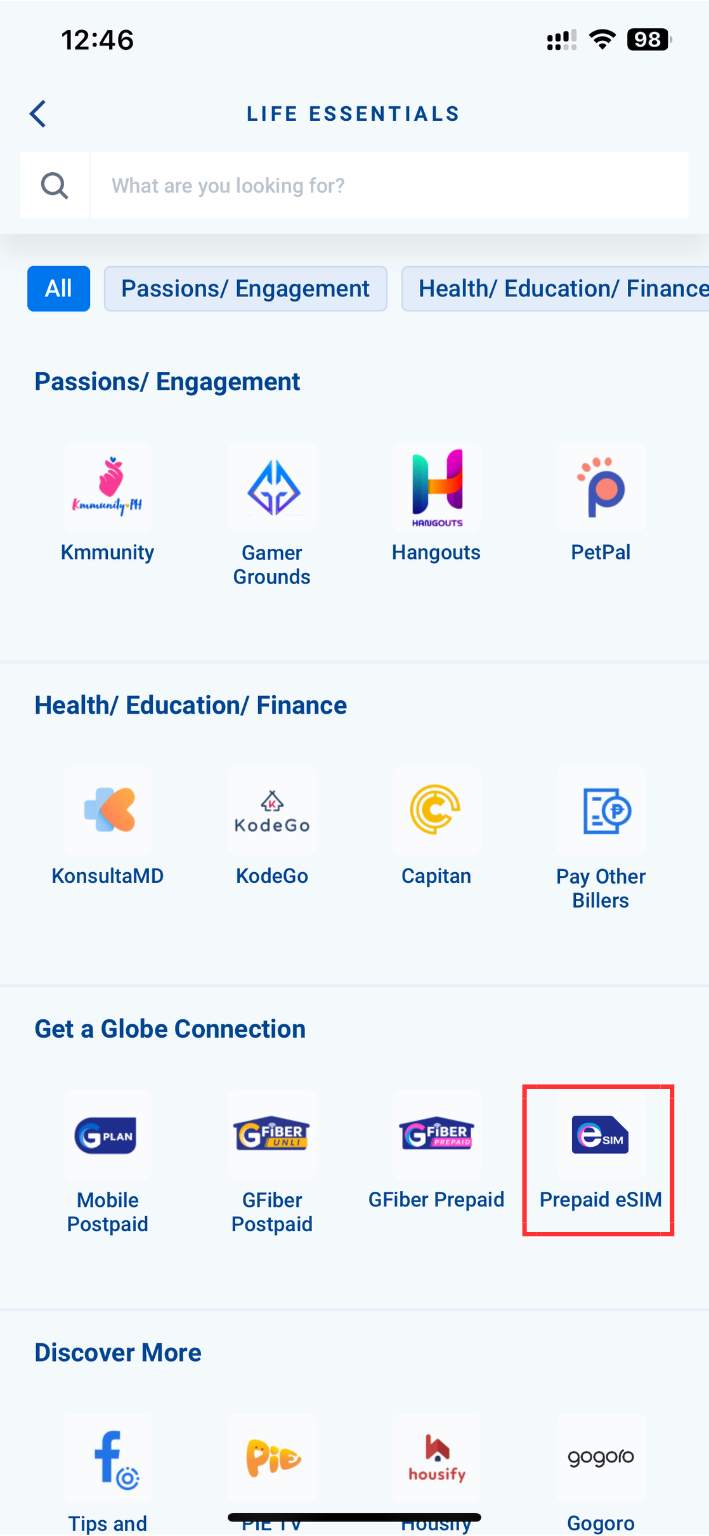
    Click Prepaid eSIM under the “Get a Globe Connection” category
    Click Prepaid eSIM under the “Get a Globe Connection” category
    Register your Globe Prepaid eSIM
    Register your Globe Prepaid eSIM
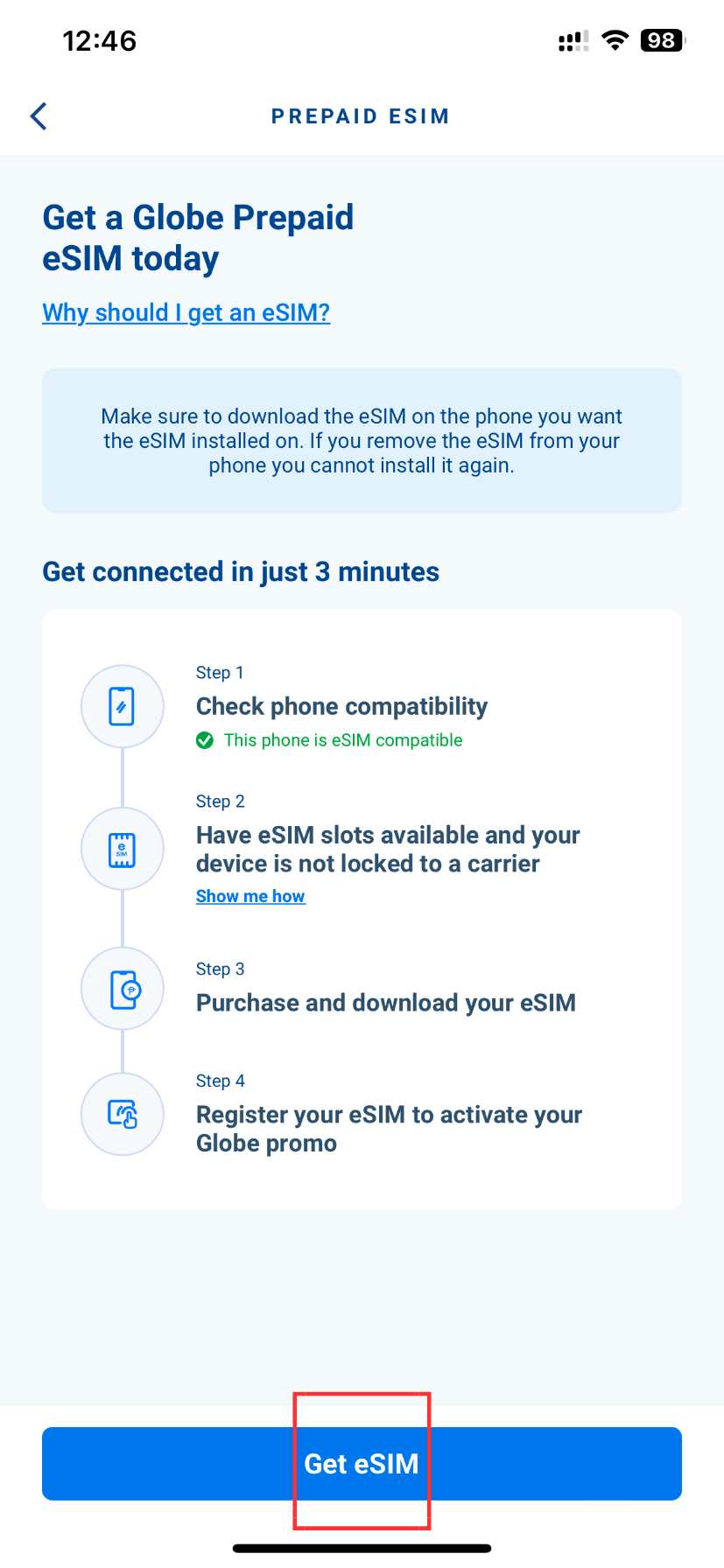
    Click the Get eSIM button, then click continue
    Click the Get eSIM button, then click continue
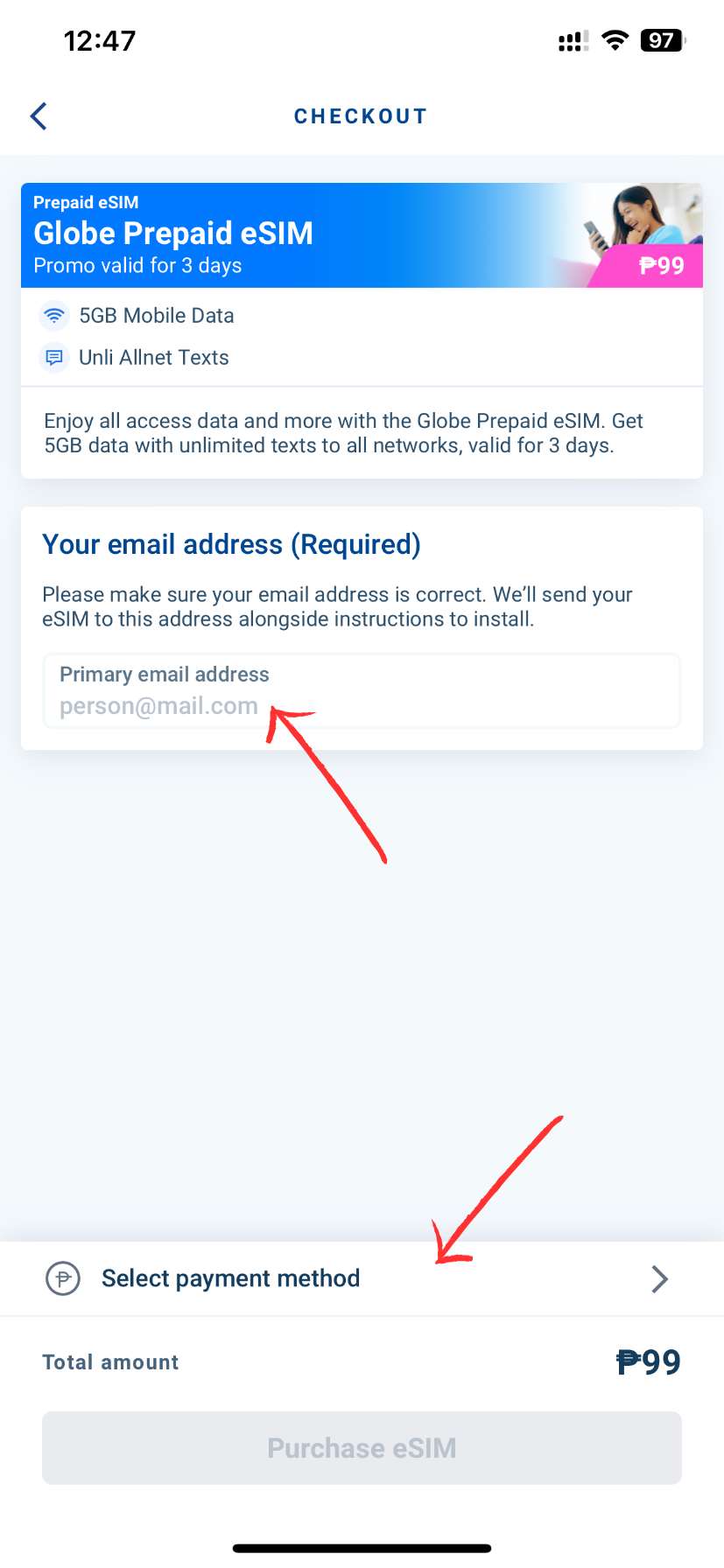
    Enter your email address
    Enter your email address
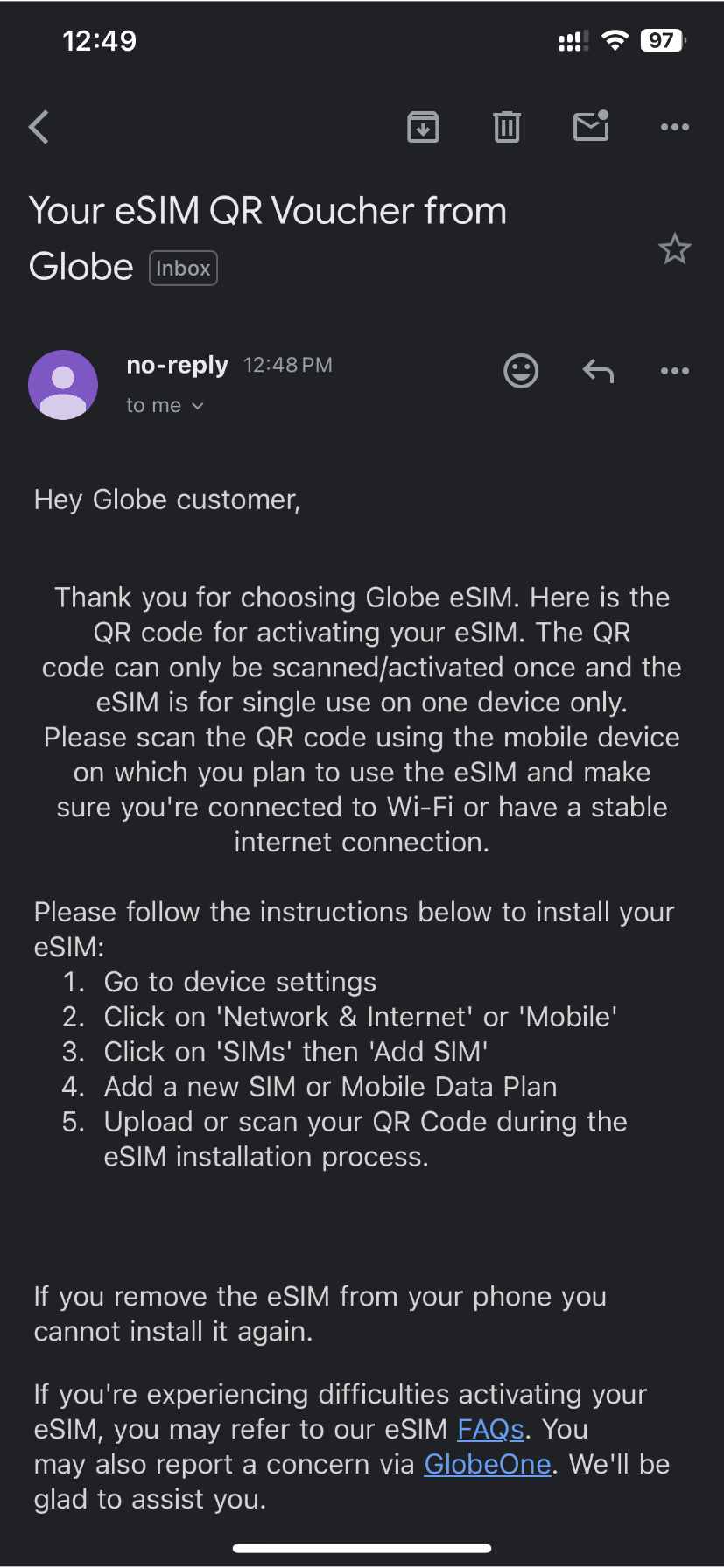
    Go to your email, and scan the QR code
    Go to your email, and scan the QR code
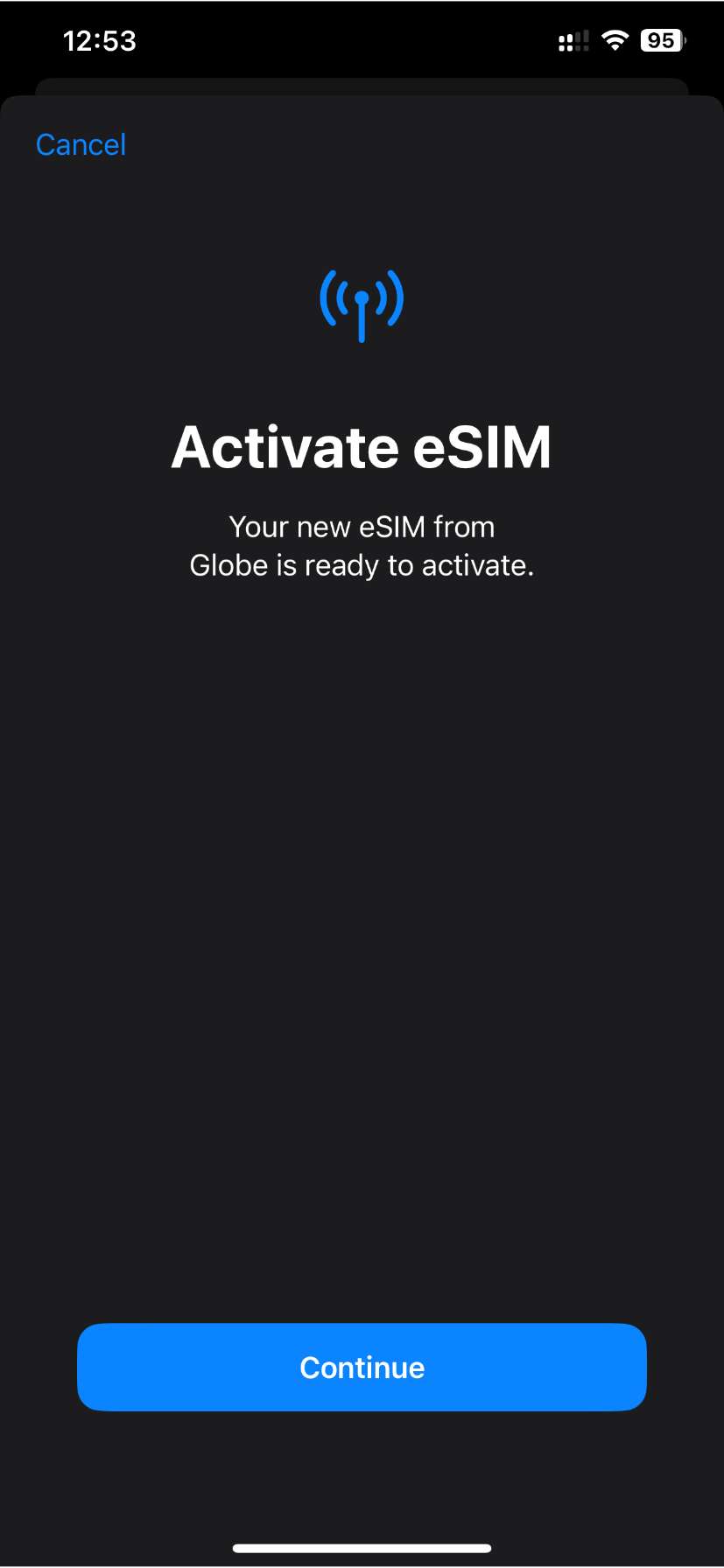
    Install the eSIM on your device
    Install the eSIM on your device

    How to buy Globe Prepaid eSIM

    1. Download the GlobeOne app on the Google Play Store or Apple App Store
    2. Login or Create an account
    3. Choose the Life Essentials icon
    4. Click Prepaid eSIM under the “Get a Globe Connection” category
    5. Click the Get eSIM button, then click continue
    6. Enter your email address
    7. Select payment method, then click Purchase eSIM
    8. Go to your email, and scan the QR code
    9. Then install the eSIM on your device
    10. After installing, proceed with SIM registration.

    How to activate eSIM 

    For Android devices: 

    1. Connect to any WiFi network/Cellular Data.
    2. Go to Settings and click on the Connections menu.
    3. Select SIM card manager and Add Mobile plan.
    4. Click on Add using the QR code.
    5. Scan the QR code.
    6. Select Add Cellular Plan.
    7. Click on OK to turn on the new mobile plan.
    8. Your new SIM profile will be displayed.
    9. Register SIM at https://new.globe.com.ph/simreg

    For Apple devices:  

    1. Ensure that you have iOS version 12.4 and above.
    2. Connect to any WiFi network/Cellular Data
    3. Go to Settings.
    4. Go to Cellular Network.
    5. Click “Add Cellular Plan” or “Add eSIM”.
    6. The camera will automatically launch
    7. Scan the QR voucher.
    8. You will be prompted that you have already downloaded the Globe eSIM.
    9. Register SIM at https://new.globe.com.ph/simreg
    Here’s a step-by-step guide on how to register your Globe Prepaid eSIM.

    For now, we don’t have any information if you can use an existing phone number when buying Globe Prepaid eSIM. If you really need to, you may apply for a Globe Postpaid plan. 

    You can also click this link for the list of phones that support eSIM. To be updated, join our Facebook group.

    Globe Prepaid Globe Prepaid eSIM Globe Telecom GlobeOne App Mobile Mobilem Promo SIM
    Share. Facebook Twitter Pinterest LinkedIn Email
    Dante Bisais
    • Website
    • Facebook
    • X (Twitter)
    • Pinterest
    • Instagram
    • LinkedIn

    Dante is an Information Technology graduate who is fascinated by technology especially computers. His passion for computers started when he was 11 years old, that inspired him to explore further. Besides writing, he also share his reviews on his YouTube channel.

    Related Posts

    GCash Adds Free GLoan Protect Insurance Through March 2026

    January 21, 2026

    BoxTrade aligns with Trade-In Made Better to simplify smartphone upgrades

    January 17, 2026

    HUAWEI MatePad 11.5 (2026) Dynamic Edition now official!

    January 16, 2026

    Lenovo and FIFA Reveal New AI Solutions, Referee Cams and Smart Venue Tech for 2026 World Cup

    January 16, 2026

    Comments are closed.

    • Facebook 16K
    • Instagram
    • YouTube 38.3K
    • TikTok
    • Twitter
    • LinkedIn
    Latest

    GCash Adds Free GLoan Protect Insurance Through March 2026

    January 21, 2026

    BoxTrade aligns with Trade-In Made Better to simplify smartphone upgrades

    January 17, 2026

    HUAWEI MatePad 11.5 (2026) Dynamic Edition now official!

    January 16, 2026
    BALASTECH
    Facebook YouTube TikTok X (Twitter) Instagram
    • Home
    • About Us
    • Contact Us
    • Privacy Policy
    • Terms and Conditions
    Copyright © 2026. BALASTECH

    Type above and press Enter to search. Press Esc to cancel.