




Apple has introduced the next generation of Apple Intelligence, built on a new system that brings Apple’s latest Apple foundation models deeper into its devices while keeping user privacy protected. This update makes everyday apps and features on iPhone, iPad, Mac, Apple Watch, AirPods, and Apple Vision Pro more helpful and personalized than ever.
The new system improves many built-in apps. Users can now edit photos more easily, browse the web in smarter ways using Safari, manage passwords more securely, and create images using the updated Image Playground tool, which can now generate more realistic results. Users can also describe what they want in simple words, and Apple Intelligence will help them complete tasks across apps.
Apple says the new Apple Intelligence features are available for developer testing now and will roll out to users later this year.
“At Apple, our mission has always been to turn the potential of advanced technology into helpful and intuitive products for everyone, and that has never been more important,”
Craig Federighi, Apple’s senior vice president of Software Engineering
“Truly helpful AI must be centered on our users’ needs, deeply integrated into the products they rely on every day, grounded in personal context, and built with privacy at every step. That is our vision for Apple Intelligence. With useful features for browsing the web, expressing creativity, editing photos, and so much more, today marks a big step forward on our journey to integrate powerful AI into the core of our platforms and make our products even more personal and useful.”
Siri AI and Systemwide Intelligence
The new Apple Intelligence system also powers Siri AI, an entirely new version of Siri that is more conversational, capable, and context-aware. Siri AI can search across messages, emails, photos, and apps, answer general knowledge questions, and perform actions across the system.
It also includes writing tools and visual intelligence features that allow Siri to understand and respond to on-screen content. Siri AI is available for developer testing now and will reach users later this year.
Smarter Photo Editing
The Photos app now has stronger editing tools powered by Apple Intelligence, as users can now adjust and improve photos more easily while keeping the original image intact. Here are some of the newest improvements in the Photos app:
- Spatial Reframing: Users can change how a photo looks by shifting the angle or framing after it has been taken, while the Extend tool allows users to expand photos, fix tilted horizons, or adjust image size without cutting out important parts.
- Clean Up tool: It is now easier to remove unwanted objects with more natural-looking results.
- SynthID: Apple also added a hidden watermark to show when images have been edited using AI.
Image Playground and Creative Tools
In addition to photo editing, Apple has also improved its Image Playground, which now supports photorealistic image generation using a new model running on Private Cloud Compute. Users can create and modify images using text prompts or touch-based editing such as circling or resizing elements.
Generated images can be used across Messages, wallpapers, and Contact Posters, with support for different aspect ratios depending on use.
Safari, Passwords, and Web Intelligence
Safari now includes AI-powered tools that organize tabs into topics, helping users manage browsing sessions more efficiently. For example, travel-related tabs can be grouped automatically for easier access. Here are some of the Safari upgrades as well:
- Notify Me: Allows Safari to monitor webpages for updates such as price drops or restocks, sending alerts when changes occur.
- Passwords app: It can now automatically detect weak or compromised credentials and upgrade them to stronger versions with a single tap, securely navigating websites on behalf of the user.
- Safari extensions: Users can now create them by simply describing what they want, allowing the system to generate custom tools directly in the browser.
Smarter Productivity Improvements and Upgrades
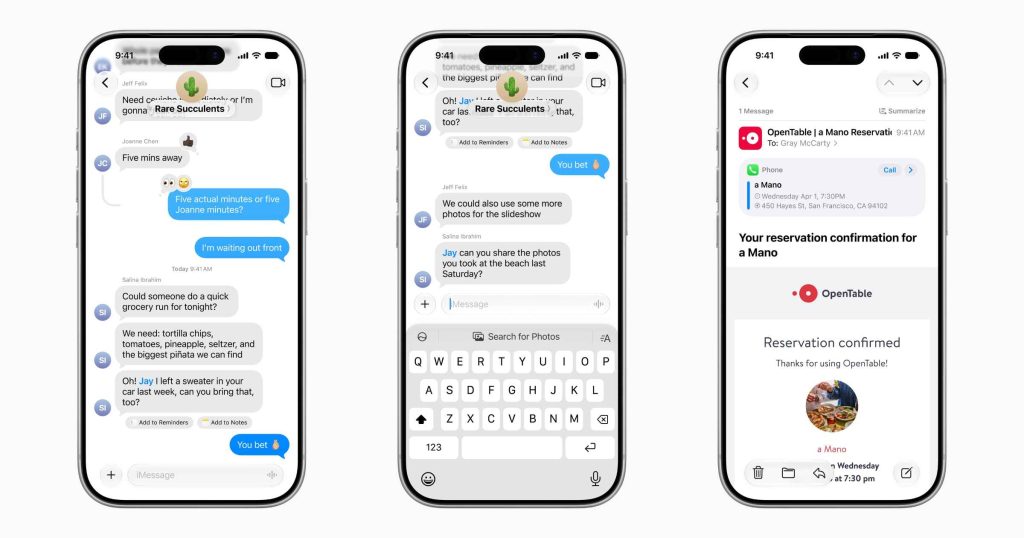
- Messages and Mail upgrades: Apple Intelligence now gives smarter suggestions in Messages and Mail, such as adding reminders, creating notes, or searching for photos directly in conversations. Smart Reply also adapts more closely to a user’s writing style.
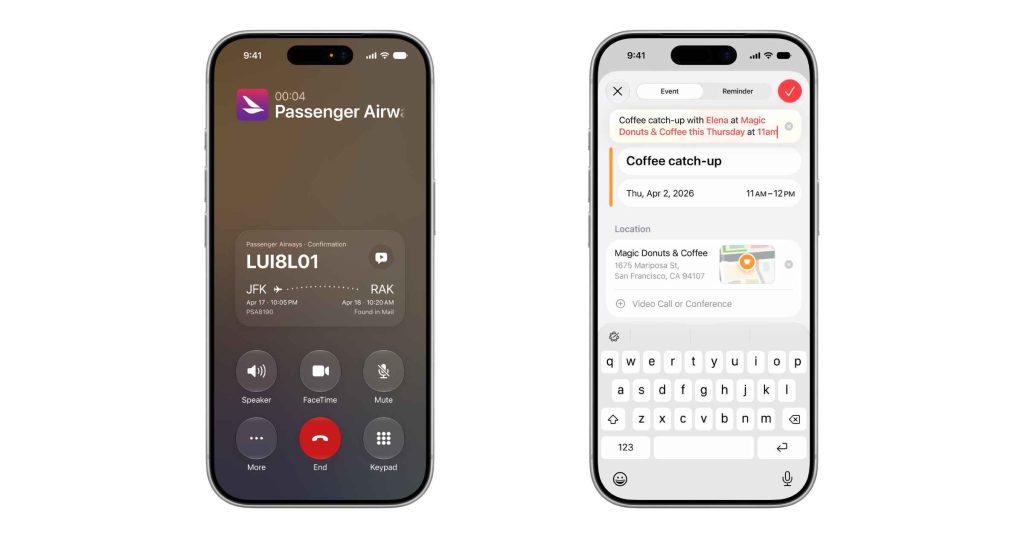
- Call Context in Phone app: During calls, Call Context can surface helpful information like reservation details or confirmation codes by securely scanning Mail on-device.
- Smarter Calendar input: Users can now create or edit events in Calendar simply by describing what they want in natural language.
- Shortcuts automation: The new “Describe a Shortcut” feature lets users build automation workflows just by typing or saying what they need.
- Smarter Home app: The Home app now groups related notifications and can generate AI descriptions of security camera footage to help users quickly understand what happened.
- Improved accessibility tools: VoiceOver, Voice Control, and Accessibility Reader now offer a better understanding of on-screen content, along with clearer summaries and more natural interaction.

Additional Accessibility Features
- VoiceOver: It now provides richer descriptions of images and on-screen content, helping users who are blind or have low vision better understand their surroundings.
- Live Recognition: This is also improved, letting users press the Action button on iPhone to ask questions about what they see and get detailed responses.
- Enhanced Magnifier: The Magnifier app now uses Apple Intelligence for better visual assistance in a high-contrast interface, improving usability for users with low vision.
- Voice Control: Voice Control becomes more intuitive, allowing users to fully control iPhone and iPad using voice commands. Users can now describe what they want on screen instead of memorizing exact labels.
- Accessibility Reader: Accessibility Reader now supports more complex content and adds AI-powered summaries and translations for easier reading.
- System-wide AI proofreading: Apple Intelligence brings automatic proofreading across apps, improving spelling, grammar, and writing clarity while users type.
- Smarter file and folder naming: The system can suggest more relevant file and folder names based on content for better organization.
- Workout Buddy expansion: Workout Buddy is now available in Spanish and works on Apple Watch even without an iPhone nearby. It also uses more fitness data for more personalized motivation.
- Improved Genmoji: Genmoji now offers better customization, allowing users to refine emojis using natural language descriptions.
Privacy-First Architecture
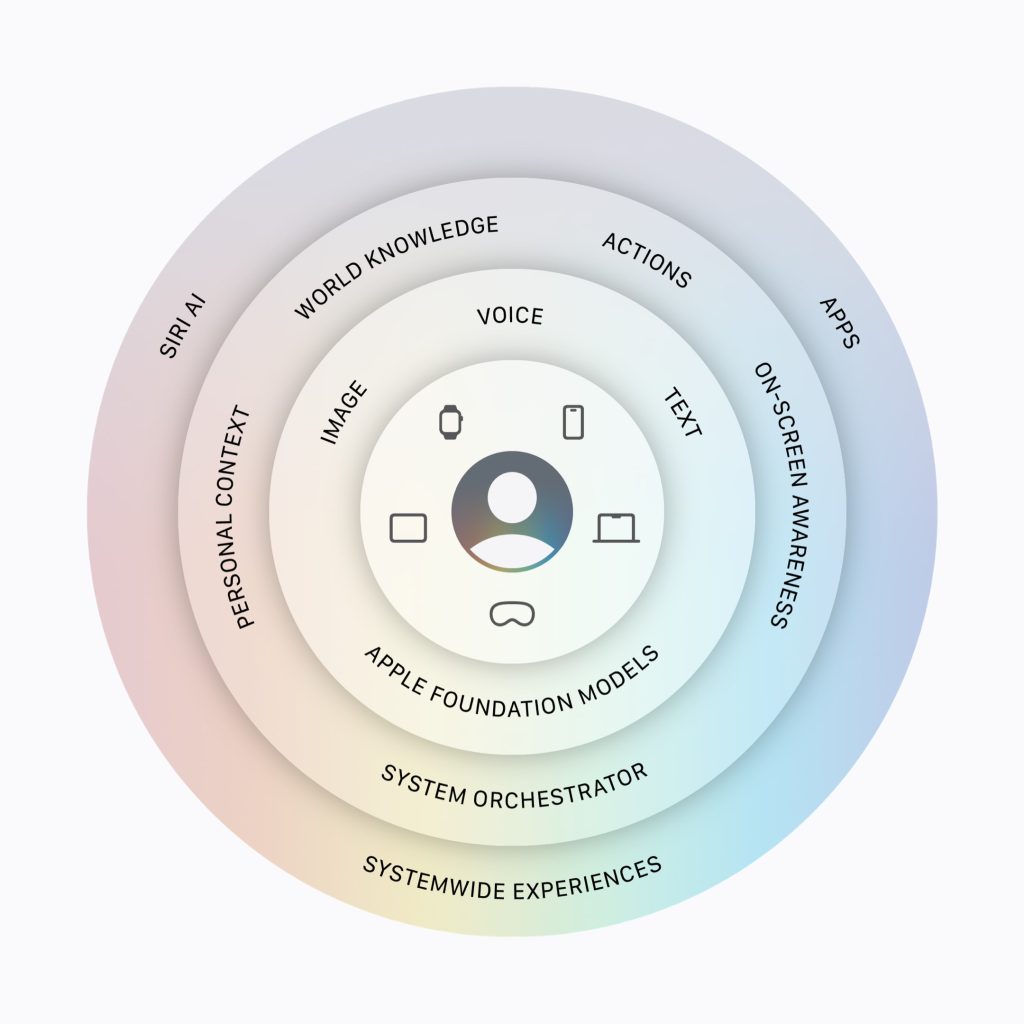
In addition to all upgrades, Apple also emphasizes that Apple Intelligence is built on a privacy-first architecture using on-device processing and Private Cloud Compute. This ensures personal data is not stored or accessible to Apple during cloud processing.
The system is powered by next-generation Apple Foundation Models running across devices and secure servers, combining performance with privacy protection.
Availability
Apple Intelligence features are currently available for developer testing through the Apple Developer Program, with public beta access expected later this year through the Apple Beta Software Program.
Full rollout is planned for supported devices later this year across iOS, iPadOS, macOS, watchOS, and visionOS.
Stay tuned for more updates!
