The deadline for old SIM registrations is in 2 days! And for those who are planning to buy new SIM cards, this step-by-step guide on SMART SIM registration is for you.
As we all know, the
Philippines has announced the SIM Registration Act that requires ALL SIM cards to
be registered before they are able to be activated. Failure to do so may end up
on service suspension or possibly legal penalties. This process will only take
a few minutes, and it will definitely contribute to maintaining a safe and
secure communications environment in the Philippines for all users.
Everything You Need
There are only few things this SIM registration requires:
Full name
Birth date
Sex
Address (Province, City/Municipality, Barangay, and Zip code)
Valid ID
Step-by-step Guide for SMART SIM Registration
1.Go to the official website of smart: smart.com.ph
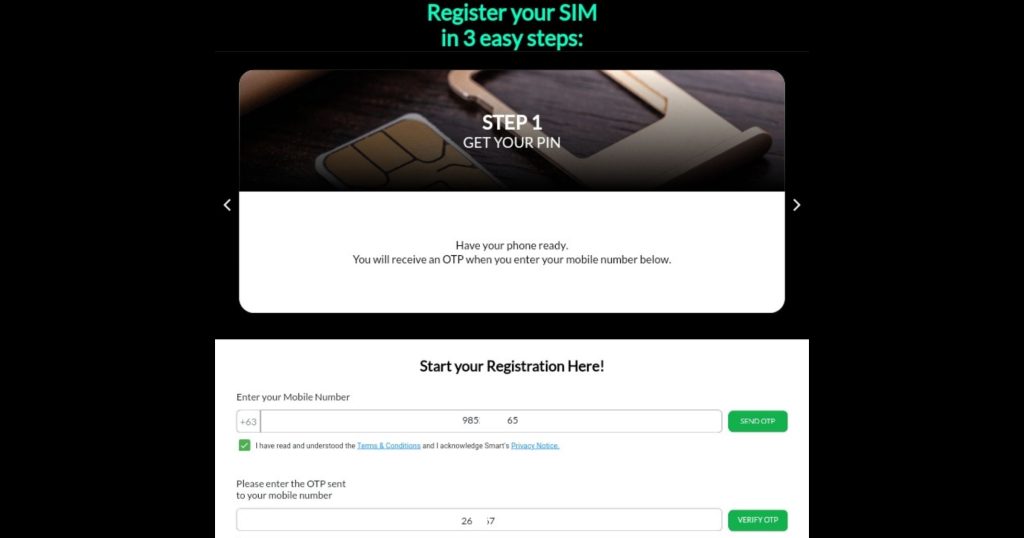
Upon opening the site, you will see this view below.
2.Click “Register SIM”
3.Enter your mobile number that you want to register, then click “Send OTP”.
You will receive a
text message with your One Time Pin.
4.Enter your One Time Pin, then click “Verify OTP”.
Your number will now
be verified, but you’re not done yet. Click “OK”, and it will direct you to the
information page.
5.Pick your type of registration and the type of your valid ID.
6.Upload your Valid ID like this and click “Submit”.
It will then ask to
scan your face and you will have to blink. After that, your ID will be verified.
7.Click “OK”, and it will let you check your information. Make sure everything is filled out, then click “Next”.
You will now be
directed to your address information, but you don’t have to fill out everything.
Only the ones with the red asterisk (*) are required.
8.Fill out your province, city/municipality, barangay, and zip code. Click “Next”.
You can also fill
out the other parts, as well as the “Alternate Contact Information”, but you
can still continue even if you don’t.
9.Check your Information Summary, click the first check box below, then click “Submit”.
There are two check
boxes below, but the other one is optional. If you want to receive
notifications from smart, you can check the second box below the “Submit”
button. Again, you can choose not to click this box.
10.You are now registered! Save your control number as a proof of your registration, as well as for future possibilities.
Common Errors
Site Loading Errors
Try these:
Close and open the App
Change browser
Change Wifi or Reconnect the internet
Airplane mode on and on
Try to register using a different phone
Extra patience
Camera Error
If your camera is not working when taking a photo of your valid ID no matter how many times you try to refresh the site, your browser could be blocking the site.
You have to go
to your browser’s settings, click “Site settings”, then “Camera”. It will show
you all allowed and blocked sites that can use your camera. You can turn off
the safety or block option for now, and you can just turn it back on after your
SIM registration.
Uploading Errors
Try these:
Move to the brighter view of the image
Keep the camera steady to avoid a blurry image
Upload instead of taking a picture
Take a picture instead of uploading
Try a different kind of ID
Do it in the morning when you can take pictures with good lighting
Register your SIM cards now for your own personal safety, and help prevent cyber scams and fraud. Let us all contribute to a safer and secure telecommunications environment.
Hannah is a writer and content creator who enjoys making technology more accessible and engaging. With a background in marketing and business operations, she writes about digital trends and innovations that impact everyday life.