
Close Menu
    Facebook X (Twitter) Instagram
    Latest Tech News in The Philippines
    Facebook YouTube TikTok X (Twitter) Instagram
    BALASTECHBALASTECH
    • Tech News
    • Reviews
    • Gaming
    • Tech Tips
    BALASTECHBALASTECH
    Home»Tech Tips»Effective Ways to Keep Your Laptop Cool
    Tech Tips

    Effective Ways to Keep Your Laptop Cool

    Dante BisaisBy Dante BisaisOctober 9, 2020Updated:April 25, 20222 Mins Read
    Facebook Twitter LinkedIn Email
    AVOID-OVERHEATING
    AVOID-OVERHEATING
    Share
    Facebook Twitter LinkedIn Pinterest Email

    Does your laptop is overheating? When your laptop is experiencing a high temperature, it causes your device to slow, and sometimes you will encounter unwanted shutdown. High temps also bad for the hardware that may decrease its lifespan. Below are ways that effectively cool your laptop.

    pexels lisa fotios 1006293

    1. Place it on a flat surface – Instead of sitting your laptop in your lap, try placing it on a flat surface because most of the laptop’s fan is located to the bottom part. It will prevent the blocking of the air intake of your machine.

    IMG20201009114324 00

    2. Elevate your Laptop – Elevating your laptop can help to have good airflow. Try to put a book or anything that can elevate the rear part of your laptop

                  Note: Make sure that it does not block the bottom fan of your laptop

    3. Consider using laptop cooling accessories – Using cooling devices that you can buy in computer stores can dramatically help your laptop in preventing from heating. And there are two popular cooling devices you can consider to buy:

    IMG20201009114451 00
    • Laptop Cooling Pad – It has a fan and also elevates your laptop that can improve your device’s airflow.
    Best Laptop Vacuum Cooling Fans
    • Laptop Vacuum Cooling Fans – It assists your stock cooling fan to release air at a high velocity. This device helps to cool down your CPU.
    IMG20201009120103 00

    4. Clean the internal of your Laptop – Maybe your laptop is too old and there is a lot of dust inside that prevents proper airflow and can cause heat to your laptop. Also, try to replace your laptop’s thermal paste.

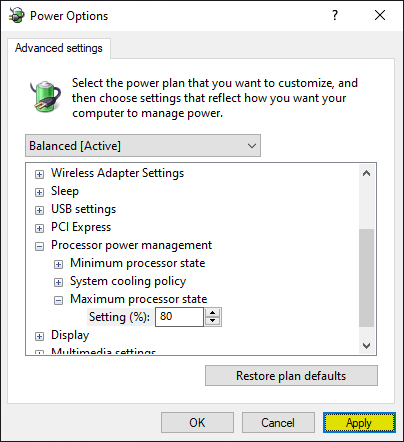
    5. Reduce Maximum Processor State – This is the easiest way to reduce your laptop’s temperature. It lessens the maximum CPU load. Below are the steps on how to reduce maximum processor state:

    1

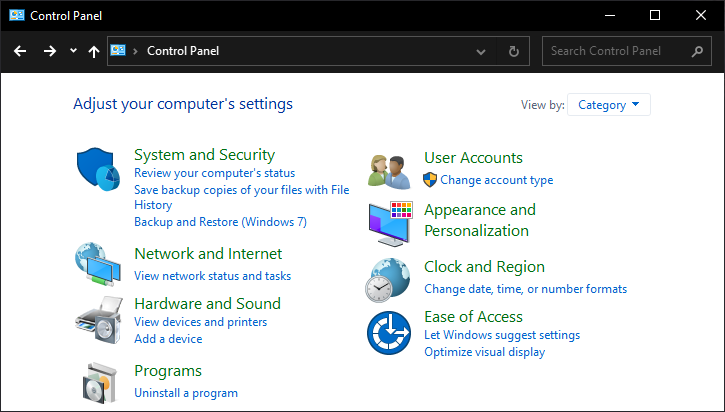
    01. Open your Control Panel

    2

    02. Click on the Hardware and Sounds

    3

    03. Select Power Options

    4

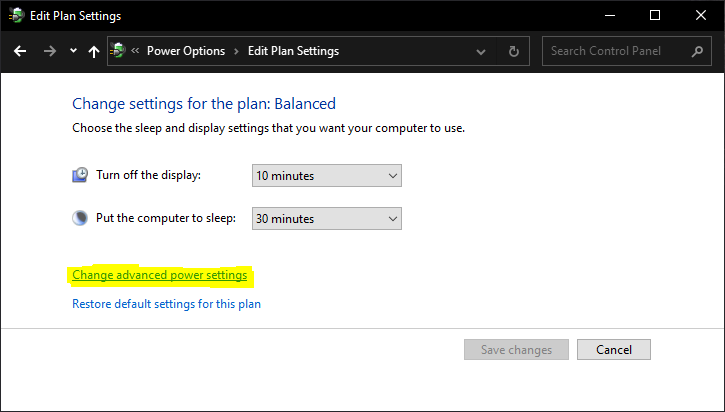
    04. Click Change plan settings

    5

    05. Click on Change advanced power settings

    6

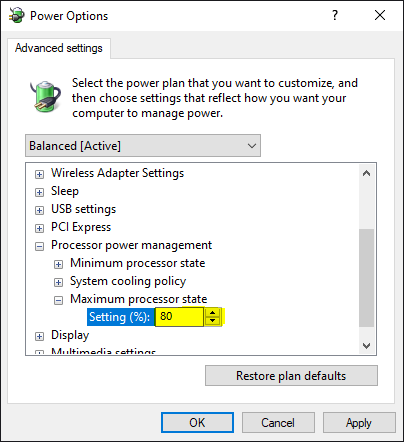
    06. Click on the “+” sign beside the Processor power management

    7

    07. Click on the “+” sign beside the Maximum processor state

    8

    08. Reduce the setting to 80%

    9

    09. Then, Click Apply

    Laptop cooler Laptop cooling Overheating
    Share. Facebook Twitter Pinterest LinkedIn Email
    Dante Bisais
    • Website
    • Facebook
    • X (Twitter)
    • Pinterest
    • Instagram
    • LinkedIn

    Dante is an Information Technology graduate who is fascinated by technology especially computers. His passion for computers started when he was 11 years old, that inspired him to explore further. Besides writing, he also share his reviews on his YouTube channel.

    Related Posts

    How to Enable GCash Watch Pay on Your HUAWEI Wearables

    April 5, 2025

    Upgrade Your Home Network with Mercusys’ Wi-Fi 7 Devices

    March 3, 2025

    How to Capture Picture-Perfect Portraits with the OPPO Find X8, according to Magic Liwanag

    December 8, 2024

    2024 Affordable Tablets in the Philippines

    July 8, 2024

    1 Comment

    1. Dr. Lappy on October 9, 2020 11:56 am

      Thank you, it helps me very much to cooldown my lappy.

      Reply
    Leave A Reply Cancel Reply

    • Facebook 16K
    • Instagram
    • YouTube 38.3K
    • TikTok
    • Twitter
    • LinkedIn
    Latest

    vivo V70’s AI Magic Weather lets users change photo moods instantly

    March 11, 2026

    HONOR Magic V6 launches in China with up to 7,150mAh battery and Snapdragon 8 Elite Gen 5

    March 11, 2026

    OPPO Find N6 is set to launch on March 17

    March 10, 2026
    BALASTECH
    Facebook YouTube TikTok X (Twitter) Instagram
    • Home
    • About Us
    • Contact Us
    • Privacy Policy
    • Terms and Conditions
    Copyright © 2026. BALASTECH

    Type above and press Enter to search. Press Esc to cancel.