

Close Menu
    Facebook X (Twitter) Instagram
    Latest Tech News in The Philippines
    Facebook YouTube TikTok X (Twitter) Instagram
    BALASTECHBALASTECH
    • Tech News
    • Reviews
    • Gaming
    • Tech Tips
    BALASTECHBALASTECH
    Home»Tech Tips»HOW TO ENABLE DITO SIM VoLTE for CALL & TEXT
    Tech Tips

    HOW TO ENABLE DITO SIM VoLTE for CALL & TEXT

    Dante BisaisBy Dante BisaisFebruary 23, 20223 Mins Read
    Facebook Twitter LinkedIn Email
    How to enable DITO SIM VoLTE for call & text
    Share
    Facebook Twitter LinkedIn Pinterest Email

    Are you wondering why your new DITO SIM cannot receive texts, calls, and your mobile
    data doesn’t work as well? In this article, we will guide you on how to enable
    DITO SIM VoLTE for call and text.

    DITO SIM VoLTE

    Enable VoLTE

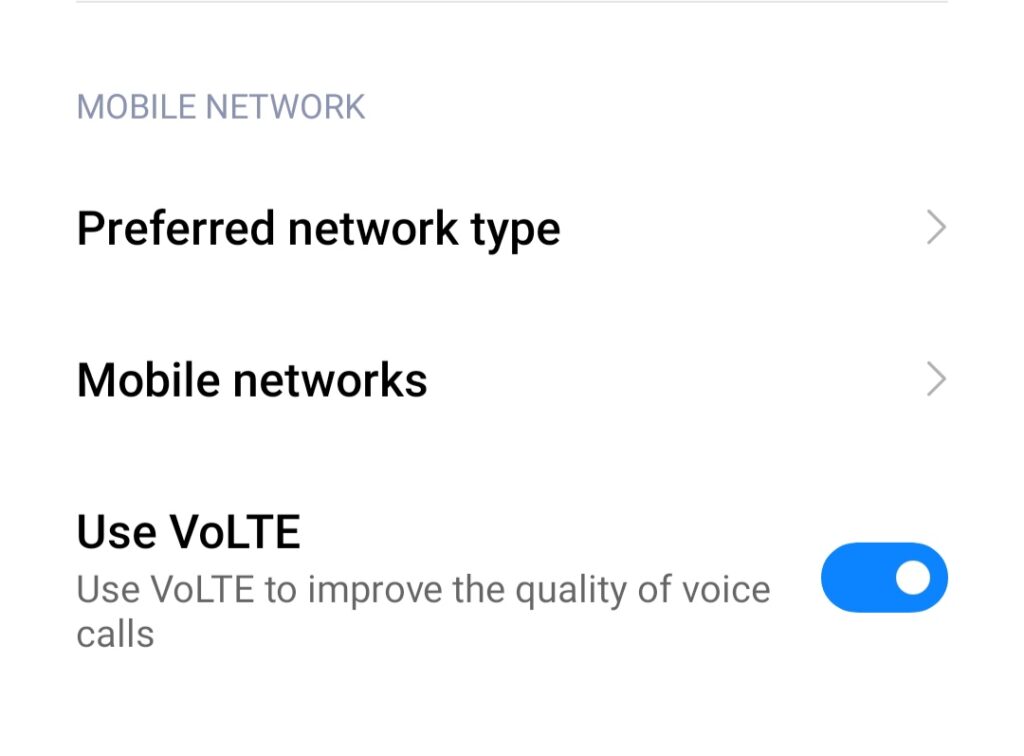
    For you to know, DITO SIM only works with mobile phones that have Voice over LTE (VoLTE) support. If your device supports VoLTE, the first thing you need to do is to enable it. Just go to your Settings, click SIM card settings or mobile network, and then turn on the VoLTE.

    In addition, VoLTE doesn’t appear on settings in some smartphones even though they support it. However, you may try typing the codes below into your phone dialer to manually activate the VoLTE:

    1. *#*#86583#*#*
    2. *#*#4636#*#*
    3. *#*#3646#*#*
    4. *#*#3646633#*#*
    5. *#*#8646633#*#*
    6. *#*#869434#*#*

    Add DITO APN

    The next thing you need to do is to manually add an APN for DITO SIM. You also need to go to your Settings again and click SIM card settings or mobile network. After that, just click the Access point names, then click Add new APN.

    DITO SIM APN

    Moreover, you only need to enter the details given below into the corresponding fields, then click Save. After adding the four APNs, you may now try if you can now send or receive texts, calls, or have a mobile data connection.

    For internet:

    • Name: DITO
    • APN: internet.dito.ph

    For MMS:

    • Name: DITO MMS
    • APN: mms.dito.ph
    • MCC: 515
    • MNC: 66
    • APN type: mms

    For IMS:

    • Name: DITO IMS
    • APN: ims
    • MCC: 515
    • MNC: 66
    • APN type: IMS

    Additional:

    • Name: XCAP
    • APN: xcap
    • MCC: 515
    • MNC: 66
    • APN type: XCAP

    If it still not working, maybe DITO still does not have service in your area. You may check their network coverage here. If you need an actual reference of the procedure, you can watch this video version of this tutorial.

    Lastly, to enjoy more DITO’s superior call quality experience with VoLTE, you can register with their data promo for as low as PHP 99. Also, they currently offering two promos that you can register, DITO 99 and 25GB High-Speed Data.

    These promos will come with unlimited texts to all networks as well as unlimited DITO-to-DITO calls. It also includes 300-minute calls to other networks. The two available promos are both valid for 30 days. Meanwhile, their only difference is the included data allocation, the DITO 99 only comes with 10GB, and 25GB for the other promo.

    To register, just download the DITO App in Google Play Store or App Store.

    APN Calls DITO SIM Internet Texts VoLTE
    Share. Facebook Twitter Pinterest LinkedIn Email
    Dante Bisais
    • Website
    • Facebook
    • X (Twitter)
    • Pinterest
    • Instagram
    • LinkedIn

    Dante is an Information Technology graduate who is fascinated by technology especially computers. His passion for computers started when he was 11 years old, that inspired him to explore further. Besides writing, he also share his reviews on his YouTube channel.

    Related Posts

    Quick Guide: How to Install GOMO eSIM on iPhone/Android Phone

    July 31, 2026

    Quick Guide: How to Transfer DITO eSIM to Another Phone

    July 31, 2026

    How to Convert Your Physical Smart SIM to eSIM on iPhone/Android

    July 31, 2026

    How to Convert Your Physical Globe SIM to eSIM on iPhone/Android

    July 31, 2026
    Leave A Reply Cancel Reply

    • Facebook 16K
    • Instagram
    • YouTube 38.3K
    • TikTok
    • Twitter
    • LinkedIn
    Latest

    Smart Brings Blacknut Cloud Gaming to Filipino Gamers at PGDX 2026

    August 12, 2026

    HONOR Robot Phone Is Now Official, Could It Be Coming to PH?

    August 12, 2026

    Smart Opens Pre-Orders for HUAWEI Pura90s Series with 5G and Exclusive Freebies

    August 10, 2026
    BALASTECH
    Facebook YouTube TikTok X (Twitter) Instagram
    • Home
    • About Us
    • Contact Us
    • Privacy Policy
    • Terms and Conditions
    Copyright © 2026. BALASTECH

    Type above and press Enter to search. Press Esc to cancel.